Blog · 8 min read
Win Federal Contracts: VPAT Examples, Annotated ACRs, QA Checklist

The Information Technology Industry Council (ITI) publishes the official VPAT templates, but a blank template never wins a bid. Procurement teams evaluate the completed Accessibility Conformance Report (ACR), so a credible example needs the right edition, full metadata (product name, version, report date, contact, standards covered), a stated evaluation method, and specific, scoped Remarks for each criterion. Public ACRs from large vendors and federal agencies are your best models for getting that right.
TL;DR:
Using the correct VPAT edition—508, WCAG, EU, or INT—is crucial for meeting specific procurement standards and avoiding disqualification.
A credible ACR must include full metadata, a clear evaluation method, scoped Remarks with specific details, and documented evidence like screenshots and issue IDs.
Well-structured Remarks should identify exact features, limitations, user impact, workarounds, and timelines, rather than vague or general statements.
The “Evaluation methods used” section should specify tools, versions, pages tested, and dates, with artifacts traceable for reviewer verification.
Before publishing, verify the header, metadata, Remarks, remediation plans, and accessibility of the document itself, so the report is accurate and trustworthy.
Table of Contents
Where to get official VPAT templates and public ACR examples
Start with the source everyone else is copying from. ITI hosts VPAT Version 2.5 in four editions, and choosing the wrong one is the fastest way to get your submission sidelined before anyone reads your Remarks.
-
508 edition: built for U.S. federal solicitations that cite Section 508 directly.
-
WCAG edition: fits commercial buyers who ask for WCAG 2.2 conformance without a federal angle.
-
EU edition: aligns with EN 301 549 for European public procurement.
-
INT edition: combines 508, WCAG, and EN 301 549 for vendors selling across multiple markets.
Section508 explains how the completed report factors into federal buying decisions and what evaluators expect to see. For real, filled examples, study the public conformance reports large vendors maintain — Microsoft, Adobe, and Google all publish ACR libraries worth modeling. Before you publish your own, strip the instruction pages ITI includes in the template and state your edition and report date plainly on page one.
A worked example: annotated ACR excerpt
Here’s what a credible report header looks like in practice:
Report title: Accessibility Conformance Report, WCAG Edition (Version 2.5) Product name and version: ProjectFlow Cloud, v4.2 Report date: March 2026 Product description: Web-based project management platform, browser-only access Contact information: accessibility@[vendor domain] Evaluation methods used: Manual keyboard and screen reader testing (NVDA 2024.1, VoiceOver on Safari 17), automated scanning (axe DevTools 4.9), sample of 12 core workflow pages tested February 2026
That last field matters more than most vendors realize. A vague “tested for accessibility” line tells a reviewer nothing they can verify.
Now the rows themselves. This is where most VPATs fall apart, because “Supports” with no explanation is functionally useless to a procurement officer trying to assess risk.
| Criterion | Conformance Level | Remarks |
|---|---|---|
| 1.1.1 Non-text Content | Supports | All informational icons carry alt text; decorative icons use aria-hidden. Verified across 12 sampled pages. |
| 1.4.3 Contrast (Minimum) | Partially Supports | Primary buttons meet contrast requirements; secondary “ghost” buttons on the dashboard fall short, affecting users with low vision. Fix planned in a future release, tracked with an issue ID. |
| 2.1.1 Keyboard | Supports | All interactive elements reachable via Tab/Shift+Tab; verified in the New Project modal and Settings panel. |
| 2.4.7 Focus Visible | Does Not Support | Custom dropdown menus in the filter bar suppress the default focus ring. Keyboard users cannot see which filter option is selected. Workaround: use screen reader announcements to confirm selection. Remediation targeted for Q3 2026. |
| 3.3.2 Labels or Instructions | Supports | All form fields in the account creation flow have visible, programmatically associated labels. |
| 4.1.2 Name, Role, Value | Partially Supports | Custom date picker exposes name and role but not current value to assistive technology. Affects screen reader users scheduling tasks. Fix in backlog, issue PF-1201. |
| 1.4.10 Reflow | Does Not Support | Dashboard layouts require horizontal scrolling at 320 CSS pixels wide, affecting users who rely on zoom. A desktop-only product scope does not make this criterion inapplicable — it covers any browser viewport. Reflow work is tracked for Q4 2026. |
Notice the pattern: each Remark names the exact feature, the specific limitation, who it affects, and what happens next. “Not Applicable” gets a reason, not just a checkbox. And for AAA-level tables or standards your product genuinely doesn’t touch, it’s fine to omit the table entirely and note why in your summary.
Pro Tip: Name the exact screen or path in every Remark, not just the feature. “Settings > Notifications > Email toggle” is verifiable in thirty seconds; “the settings area” sends a reviewer hunting.
How to write remarks that actually hold up
The strongest Remarks follow a simple structure: feature or screen, then the specific failure, then the user impact, then a workaround if one exists, then a remediation plan with a timeline or issue ID. Skip any of those five pieces and you’ve given a reviewer a reason to discount the whole report.
Here’s the difference in practice, using WCAG 2.1.1 Keyboard as the example:
-
Weak: “Keyboard accessible.”
-
Strong: “All primary navigation and the New Project modal are fully keyboard operable. The color picker in Theme Settings currently traps focus; users can escape with Esc but cannot reach the Save button by keyboard. Workaround: use Tab from outside the modal to reach Save first. Fix scheduled for v4.4, tracked as PF-1240.”
Templated starting points for each conformance level:
-
Supports: “[Feature] is fully operable via [method]; verified across [scope].”
-
Partially Supports: “[Feature] supports [what works] but [specific gap], affecting [who]. Workaround: [if any]. Fix planned for [timeline/issue ID].”
-
Does Not Support: “[Feature] does not support [criterion]. Users relying on [AT/method] experience [impact]. Remediation targeted for [timeline].”
-
Not Applicable: “[Criterion] does not apply because [product-specific reason, not a generic disclaimer].”
The most common mistakes are vague scope (“most pages support this”), missing reproduction steps, no remediation plan at all, and overclaiming full support when testing only covered a handful of screens. Reviewers doing risk-based evaluation trust specificity, not confidence.
Pro Tip: When you describe a workaround, name a reproducible route: “Login screen → Create project → New project modal” beats “navigate to the project creation area” every time.

What to record so reviewers can verify your claims
Your “Evaluation methods used” field carries more weight than most vendors give it. Vispero’s guidance on building a credible ACR points to the same core evidence procurement officers look for:
-
Automated scans: name the tool and version, plus the date the scan ran.
-
Manual keyboard testing: note which workflows were tested by hand, not just clicked through with a mouse.
-
Assistive technology checks: list the AT name, version, and platform (NVDA 2024.1 on Windows 11, VoiceOver on macOS Sonoma, and so on).
-
User testing notes: if people with disabilities tested the product directly, say so and describe the scope.
-
Trusted Tester or equivalent protocol: federal buyers often expect this specifically, and some solicitations require it over a vendor’s own testing.
For each method, record the tool version, browser or platform, which pages were sampled, testing dates, and whether the scope was complete or a representative sample. Keep the underlying artifacts, too: scan export files, issue-tracker IDs, and timestamped screenshots. Reviewers can’t verify a claim they can’t trace, and some solicitations require a third-party audit or documented Trusted Tester evidence regardless of what your own ACR says.
Which VPAT edition fits your buyer
Getting the edition wrong wastes an evaluator’s time before they even reach your Remarks, and in a competitive procurement, that’s often enough to get your submission set aside.
-
U.S. federal solicitation citing Section 508: use the 508 edition, full stop.
-
Commercial buyer asking for WCAG conformance: use the WCAG edition; it’s the standard for general enterprise reporting.
-
International or EU public procurement: use the EU edition to map directly to EN 301 549.
-
Buyer requiring multi-standard reporting: use the INT edition, which covers 508, WCAG, and EU criteria in one document.
When a solicitation doesn’t specify, default to whichever edition matches where your buyer is headquartered and check the RFP language for explicit standard references before you submit anything.
A final QA pass before you publish an ACR
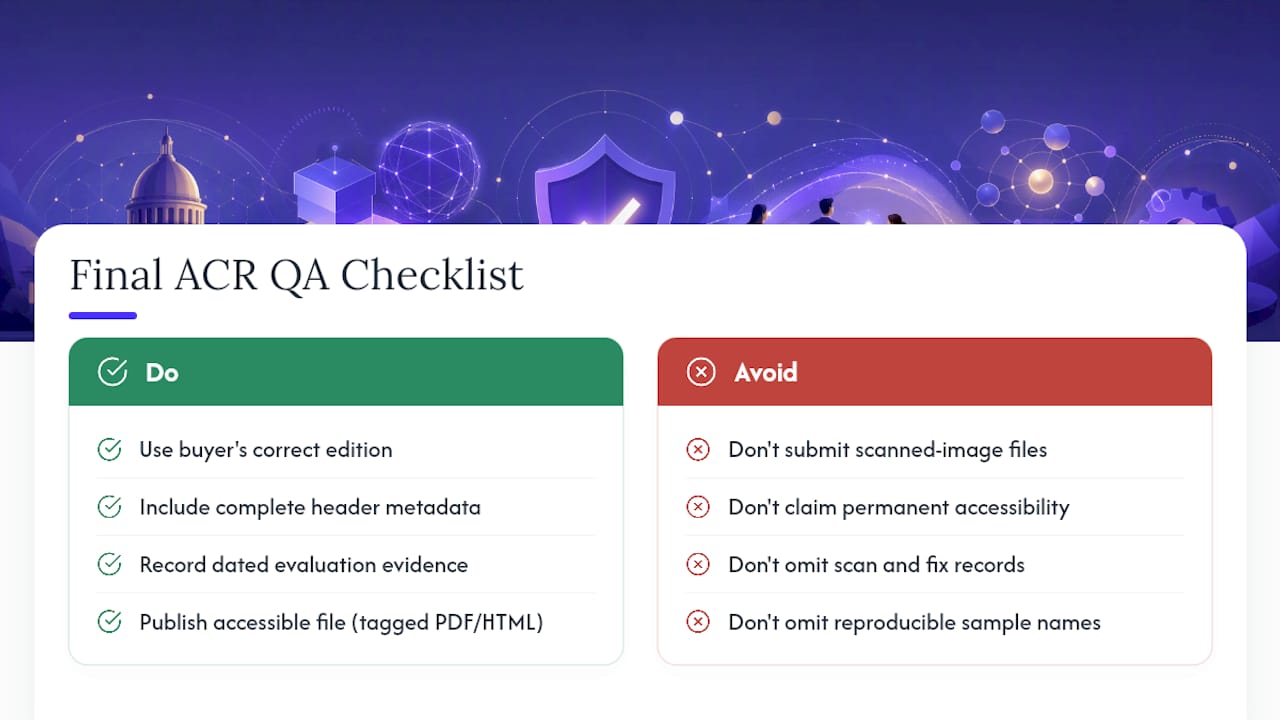
Before an ACR goes out, run it against a short list: correct edition for the buyer, complete header metadata, explicit evaluation methods with dated evidence, reproducible sample pages named specifically, Remarks that are scoped and honest rather than aspirational, remediation plans tied to real timelines or issue IDs, and a published file that’s itself accessible (tagged PDF or accessible HTML, not a scanned image).
Keep dated records of every scan and every fix behind the claims in your report, and publish or submit the ACR in whatever format the solicitation instructs. An ACR is a snapshot of where a product stands today, not a certification that it’s accessible forever. Buyers know this. What they’re actually doing when they read your report is a risk-based evaluation, weighing how much they trust your documentation against how much exposure they’re willing to accept. A well-built ACR, backed by tools that keep your scan history and fixes on record like AccessWiser’s accessibility solutions, gives them less reason to hesitate.
Sources
- Section508
Articles on this blog are general information about web accessibility, not legal advice. Laws change and their application depends on your specific situation — for decisions with legal consequences, consult a qualified legal professional.