Blog · 9 min read
Target WCAG 2.2 AA First: When Implementers Should Add AAA

Target WCAG 2.2 Level AA as your baseline. It’s the practical legal and usability floor that most laws, courts, and procurement rules point to, and it’s what the W3C itself recommends for general use. Reserve Level AAA for specific criteria that genuinely benefit your users, tested and documented one by one, not as a sitewide mandate.
TL;DR:
WCAG 2.2 Level AA compliance covers all previous WCAG levels and is the practical baseline for most legal and usability standards.
The difference between AA and AAA mainly involves strict numeric ratios, larger touch targets, and additional content requirements like sign language interpretation for videos.
Nearly all US regulations and contracts reference WCAG Level AA, making AAA criteria optional and often impractical for widespread implementation.
Testing should combine automated scans with manual reviews, recorded with dated results, remediation tickets, and ongoing re-checks for continuous compliance.
Focusing on testing and documentation consistently outweighs chasing higher conformance levels, as AAA criteria are context-dependent and often unnecessary for the target user base.
Table of Contents
What Do WCAG Levels A, AA, and AAA Actually Mean?
WCAG organizes its success criteria into three tiers, and understanding how they stack matters more than memorizing the labels. Level A covers the most basic barriers, things like keyboard access and text alternatives for images. Level AA builds on top of that with criteria most businesses treat as the compliance target: color contrast ratios, resizable text, consistent navigation. Level AAA adds the strictest layer, covering edge cases and enhanced accommodations that go beyond what’s typically required.
Here’s the part people misunderstand: conformance is cumulative. According to the W3C’s own conformance guidance, claiming Level AA conformance means your site already satisfies every Level A criterion plus every Level AA criterion. Claim AAA, and you’re on the hook for all three tiers combined. There’s no skipping around. You can’t cherry-pick AAA criteria while ignoring Level A basics and call it “AA conformant with extras.”
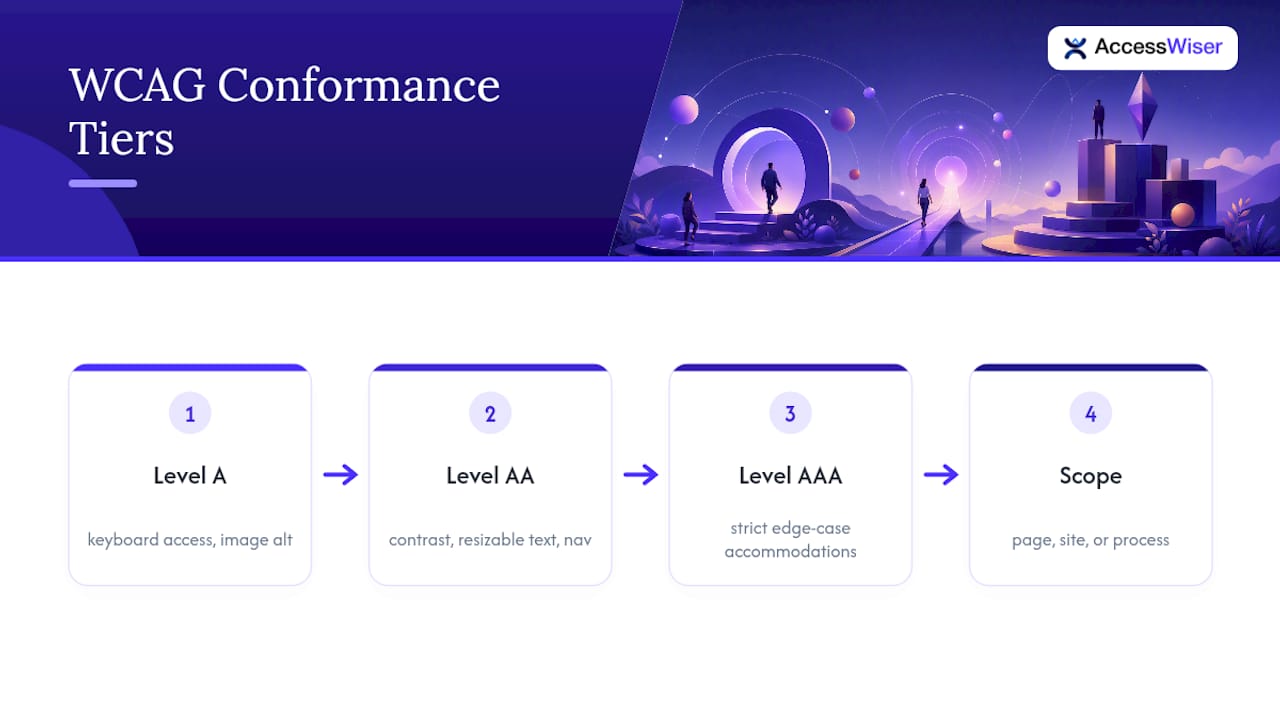
Conformance also gets measured at a defined scope, whether that’s a single page, a full site, or a set of pages that together form a complete process (think a checkout flow). You can’t claim conformance for a homepage while your account settings page remains broken.
On the version question: WCAG has moved from 2.0 to 2.1 to 2.2, with each release adding criteria rather than removing them. Targeting WCAG 2.2 AA covers virtually everything referenced by 2.0 and 2.1 rules, since those older criteria still apply. It’s the most future-proof choice for a compliance program that needs to satisfy multiple overlapping standards at once.
AA vs AAA: The Technical Differences That Actually Matter
The gap between AA and AAA isn’t abstract. It shows up in specific, testable numbers and design decisions.
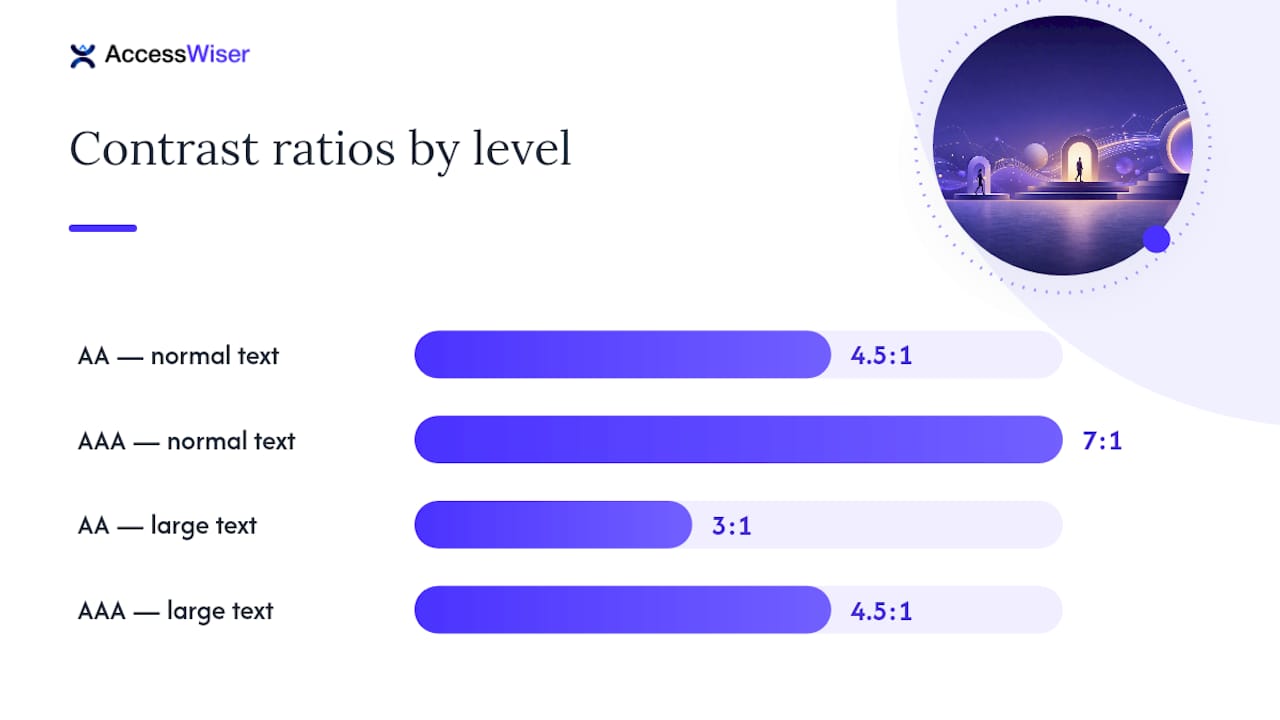
Color contrast is the clearest example. Level AA requires a 4.5:1 contrast ratio for normal text and 3:1 for large text. Level AAA raises that bar to 7:1 and 4.5:1, respectively. That difference sounds small until your design system uses a light gray on white for secondary text. AA might pass; AAA almost certainly won’t without a redesign of your color tokens.
Other differences worth knowing:
-
Non-text contrast: AA requires 3:1 contrast for UI components like button borders and form fields. AAA has no separate, stricter numeric requirement here, but the overall AAA text ratios push related visual elements higher by association.
-
Reflow and text spacing: both are AA requirements (content must reflow at 400% zoom without horizontal scrolling, and users must be able to adjust line height and spacing). Neither escalates at AAA, but they’re commonly confused with AAA-only rules.
-
Target size: WCAG 2.2 sets a 24 by 24 pixel minimum at AA; AAA pushes that to 44 by 44 pixels, closer to Apple’s and Google’s own touch-target guidelines.
-
Timeouts: AA requires users get a warning and the ability to extend session limits. AAA-level criteria go further, in some cases eliminating time limits almost entirely unless the timing is essential.
-
Sign language for prerecorded video: this one exists only at AAA, and it’s not really an engineering task. It’s a content and budget decision, since producing sign-language interpretation for every video asset requires ongoing production investment.
That sign-language criterion illustrates why the W3C cautions against mandating AAA sitewide: some AAA criteria are functionally impossible for certain content types, and forcing full AAA compliance can conflict with real professional website design considerations and business constraints.
Roughly 1.3 billion people worldwide live with some form of disability, and that’s the population these thresholds exist to serve. AA already accommodates the overwhelming majority of that need; AAA criteria tend to serve narrower, higher-severity use cases.
How Do Regulators and Contracts Treat AA vs AAA?
Nearly every US legal and procurement framework points to Level AA, not AAA. The DOJ’s ADA web guidance treats WCAG AA as the reference point regulators expect covered entities to meet, and it’s the level most Title II and Title III settlement agreements have historically cited. Section 508 procurement rules follow the same pattern, though the specific WCAG version referenced varies by which agency or rule you’re dealing with.
That version variance matters more than most compliance owners realize. Federal buyers frequently still expect the 508 edition of a VPAT, which maps to WCAG 2.0 criteria, while state and local government buyers, along with a growing number of private contracts, expect rows mapped to 2.1 or 2.2. Suppliers selling into both markets often use an INT (international) edition VPAT with multiple version rows rather than picking just one.
Nowhere in US regulatory practice or common settlement language does AAA appear as a baseline requirement. If a contract does specify AAA, treat it as a red flag worth clarifying, since it likely means the drafter copied boilerplate language without understanding what full AAA conformance would actually demand from your content team. When you do write accessibility requirements into a vendor contract or RFP, specify WCAG 2.2 Level AA explicitly, name the VPAT edition you expect, and call out any individual AAA criteria you want as enhancements rather than referencing “AAA” as a blanket target.
When Should You Adopt AAA Criteria Selectively?
Start by mapping your priority user journeys, not your entire site. Purchase flows, account management, and support pages carry the highest risk and the highest usability payoff, so they deserve first attention before you even think about AAA enhancements.
From there, work through a simple decision sequence:
-
Confirm AA conformance across the full site first. AAA additions on top of an incomplete AA baseline just create a false sense of progress.
-
Identify your actual user base. If you serve populations with low vision, cognitive disabilities, or specific assistive-technology needs, some AAA criteria (extended timeouts, higher contrast) deliver real value.
-
Check technical feasibility. Some AAA criteria, like the 7:1 contrast ratio, may require a color-system overhaul. Others, like extended timeout allowances, are a quick configuration change.
-
Weigh content-type constraints. Video-heavy sites face real costs implementing AAA’s sign-language requirement; text-heavy sites generally don’t.
-
Document the decision. Note which AAA criteria you adopted, why, and for which pages, so the choice reads as deliberate rather than accidental during an audit.
Watch for conflicts between AAA criteria and existing design systems or security requirements, for instance, session timeout extensions that clash with financial-services security policy. When that happens, document the constraint and the mitigation rather than silently skipping the criterion.
Pro Tip: Treat AAA as a menu, not a checklist. Pick the two or three criteria most relevant to your actual audience and implement those well, rather than chasing partial AAA coverage across the board.
How Do You Test and Document WCAG Conformance?
Automated scanners are the fastest way to surface a large share of accessibility problems, but they have a hard ceiling. The WebAIM Million project has repeatedly found that automated tools catch a substantial subset of issues, roughly half, leaving the rest for manual review. Contrast ratios, missing alt text, and malformed HTML are easy for a scanner to flag. Logical reading order, meaningful focus states, and whether a screen reader announcement actually makes sense require a human tester, ideally one using real assistive technology.
Sound documentation includes:
-
Dated scan results showing the criteria tested and the version of WCAG used
-
Remediation tickets tied to specific findings, with resolution dates
-
A published accessibility statement describing your conformance target and known limitations
-
A recurring re-check schedule, since code changes reintroduce regressions constantly
-
The correct VPAT/ACR edition for your buyer type, whether that’s the 508 edition for federal work or a WCAG 2.1/2.2 edition for state and private contracts
Integrate accessibility checks directly into your CI pipeline so obvious regressions get caught before deployment, not after a customer complaint or demand letter.
How AccessWiser Supports an AA-First Compliance Program
Scanning against WCAG 2.2 AA criteria, with mappings to Section 508 and EN 301 549, gives you evidence that speaks the language procurement teams and legal reviewers already expect. AccessWiser ties every finding to the specific element and criterion it violates, then pairs that with plain-language remediation guidance so fixes happen in your actual code rather than through a runtime patch that disappears the moment the tool is removed.
Scheduled re-checks catch regressions before they become the subject of a complaint, and the dated scan and fix history builds a documented record that supports both procurement requirements and, if it ever comes to that, litigation defense. Development teams can pull findings directly into their existing ticketing workflow, and the same data feeds naturally into VPAT and ACR reporting when a buyer asks for formal documentation. AccessWiser’s accessibility solutions are built around that AA-first, evidence-first approach rather than treating a scan as a one-time pass/fail event.
The Real Question Isn’t AA or AAA. It’s Whether You’re Testing at All.
Most of the debate over AA versus AAA misses the point. Organizations spend enormous energy arguing about conformance levels while running zero manual tests and no re-check schedule, which makes the whole exercise theoretical. AA conformance you can actually prove, with dated scans and documented fixes, beats an AAA aspiration that exists only in a policy document nobody has tested against.
The conventional advice, “aim for AA, done,” is correct but incomplete. It skips the harder truth that AA itself is not static. Code changes, redesigns, and new features break conformance constantly, and a single point-in-time audit tells you nothing about next quarter. If there’s one thing implementers should prioritize first, it’s building the monitoring habit before worrying about which AAA criteria to layer on top.
The other overlooked nuance: AAA isn’t a ceiling to chase for its own sake. It’s a toolkit. Pick the criteria your actual users need, skip the ones that don’t fit your content, and document why. That’s not a compromise. It’s how the standard was designed to work.
— The AccessWiser Team
Sources
Articles on this blog are general information about web accessibility, not legal advice. Laws change and their application depends on your specific situation — for decisions with legal consequences, consult a qualified legal professional.
Articles on this blog are general information about web accessibility, not legal advice. Laws change and their application depends on your specific situation — for decisions with legal consequences, consult a qualified legal professional.