Blog · 16 min read
38 WCAG Rules U.S. Developers Must Meet for Section 508

Section 508 is federal law. WCAG is not. For covered federal information and communication technology, the Revised 508 Standards legally require conformance with WCAG 2.0 Level A and AA success criteria, with a handful of specific exceptions for non-web documents and software. Treat WCAG as your technical checklist and Section 508 as the legal container that defines who must comply, what gets scoped in, and how procurement enforces it. Your first move: adopt WCAG 2.0 AA as your floor, document your scope in writing, and schedule manual verification.
TL;DR:
Most federal ICT must comply with WCAG 2.0 Level AA success criteria, with some specific exceptions for non-web content and software.
Agencies enforce Section 508 primarily through procurement, requiring detailed documentation like VPATs and often exceeding the legal baseline by adopting later WCAG versions.
WCAG 2.0 includes 38 success criteria, but newer versions add important criteria, although only 2.0 AA is legally required for federal compliance.
Manual testing methods like Trusted Tester and ongoing re-checks are essential for credible conformance evidence, as automated scans only catch part of the accessibility gaps.
Private organizations generally are not directly bound by Section 508, but WCAG 2.1 AA is a sensible target, since it is the standard in the DOJ’s ADA Title II rule and is widely cited in ADA settlements.
Table of Contents
WCAG vs Section 508: The Core Differences at a Glance
The confusion between these two frameworks comes down to one distinction: WCAG is a technical standard produced by a voluntary international body, and Section 508 is a binding legal requirement enforced by the U.S. government. They are not competitors. They are stacked, with one inside the other.
WCAG, published by the W3C, tells you exactly how to build accessible interfaces: contrast ratios, focus order, alternative text, form labeling. Section 508, part of the Rehabilitation Act, tells you who is legally obligated to follow those rules and under what circumstances. You can build a WCAG-conformant website without ever thinking about Section 508. You cannot satisfy Section 508 without engaging with WCAG, because the Revised 508 Standards pull WCAG 2.0 Level A and AA success criteria directly into the regulatory text.
Here’s where the two diverge in practice:
-
Legal force: WCAG carries no penalty for noncompliance on its own. Section 508 is binding on federal agencies, and it reaches contractors through the requirements agencies write into their contracts.
-
Who is covered: Section 508 binds federal agencies when they develop, procure, maintain, or use ICT. Contractors are affected because agencies may only buy conforming ICT. Recipients of federal funding are generally covered by Section 504 instead, not by Section 508 directly. WCAG applies to anyone who chooses to follow it, including private companies that use it as their ADA benchmark.
-
Version referenced: Section 508 legally requires WCAG 2.0 AA, not the newer 2.1 or 2.2 releases, even though those newer versions exist and add meaningful criteria.
-
Documentation expectations: Section 508 compliance typically demands procurement paperwork like VPATs, while WCAG conformance alone carries no standard documentation format.
-
Why agencies often exceed the legal floor: many federal teams voluntarily target WCAG 2.1 or 2.2 to reduce future remediation work and improve outcomes for mobile and cognitive-accessibility use cases, even though the law only requires 2.0 AA.
If you’re building for a private-sector client with no federal contract, Section 508 doesn’t legally touch you. But WCAG Level AA (2.0 or, increasingly, 2.1) is the benchmark most ADA-related settlements cite, and the Department of Justice’s 2024 ADA Title II rule adopted WCAG 2.1 AA for state and local governments, so the practical gap between “legally required” and “smart to do anyway” is narrower than it looks on paper.
What Does Section 508 Actually Require?
The regulatory text lives in E205 of the Revised 508 Standards, and it’s more specific than most developers expect. Section508.gov’s applicability and conformance guidance confirms that WCAG 2.0 Level A and AA success criteria are incorporated by reference in E205.4, meaning they’re not a suggestion. They’re the accessibility standard for covered ICT, full stop.
Scoping determines what “covered” actually means for your organization. The Revised 508 Standards apply broadly across three categories, and each one carries its own wrinkles:
-
Web content: Public-facing federal agency websites, intranets, and web applications must conform to WCAG 2.0 AA in essentially the same way any public website would.
-
Non-web documents: PDFs, Word files, and other electronic documents produced or distributed by covered entities fall under the standard, but with specific carve-outs (more on those below).
-
Software and native applications: Desktop and mobile software procured or developed by federal agencies must meet the same success criteria, adjusted through word substitution where “web page” language doesn’t map cleanly onto a standalone application.
Two practical realities shape how this plays out. First, a safe harbor provision means existing ICT that conformed to the original 508 Standards doesn’t need retrofitting to the revised ones, as long as it hasn’t been altered since January 18, 2018. Alter a component and that component must meet the Revised 508 Standards.
Second, procurement is where Section 508 actually gets enforced day to day. Federal agencies increasingly build accessibility language directly into solicitations using tools like the Accessibility Requirements Tool (ART), which extracts the specific 508 provisions relevant to a given contract and turns them into solicitation language that vendors are evaluated against. If you’re selling software or services to a federal agency, your accessibility conformance isn’t a nice-to-have during the RFP process. It’s often a pass/fail gate.
Pro Tip: Don’t wait for a solicitation to ask about accessibility requirements. Build a standing VPAT and a documented WCAG 2.0 AA conformance record before you bid, so you’re not scrambling to produce evidence on a two-week procurement deadline.
What Is WCAG and Why Does 2.0 AA Matter?
WCAG organizes every guideline under four principles, often shortened to POUR: content must be Perceivable, Operable, Understandable, and Robust. Under those four principles sit individual success criteria, each assigned a conformance level: A (minimum), AA (mid-tier and the most commonly required), or AAA (highest, rarely mandated in full because some criteria are impractical for certain content types).
WCAG 2.0 contains 38 success criteria at Levels A and AA combined. That number matters because it’s the actual scope of what Section 508 legally requires you to test against. It’s not an abstract “be accessible” mandate. It’s a finite, enumerable checklist, which is exactly why automated scanning tools and manual auditors can work from it systematically rather than guessing.
WCAG has evolved since that 2.0 baseline. WCAG 2.1 added criteria addressing mobile accessibility, low vision, and cognitive disabilities. WCAG 2.2, the current version, added further criteria such as focus not obscured, target size, dragging movements, consistent help, redundant entry, and accessible authentication, and it removed 4.1.1 Parsing as obsolete. Section 508 has not been updated to legally require either newer version, which creates a real gap: you can meet the Section 508 baseline while still leaving mobile and cognitive-accessibility gaps unaddressed. That gap is exactly why forward-looking teams voluntarily target 2.1 or 2.2 anyway, so less rework is needed if the legal baseline is updated later.
In practice, most remediation work concentrates on a recurring set of technical items: semantic HTML markup that screen readers can actually parse, full keyboard navigability without mouse dependency, captions and transcripts for audio and video, and color contrast ratios that meet the 4.5:1 minimum for normal text. Get those four categories right and you’ll have addressed many of the most common findings on a typical audit.
The Legal Backbone: How Section 508 Gets Enforced
Section 508 is part of the Rehabilitation Act of 1973. It was added in 1986 and strengthened in 1998, when Congress required federal agencies to make their electronic and information technology accessible. That amendment gave the law its current reach: it binds federal agencies directly, and it reaches vendors indirectly because agencies must buy accessible ICT. Organizations that receive federal funding fall under Section 504 of the same act, which is a separate obligation.
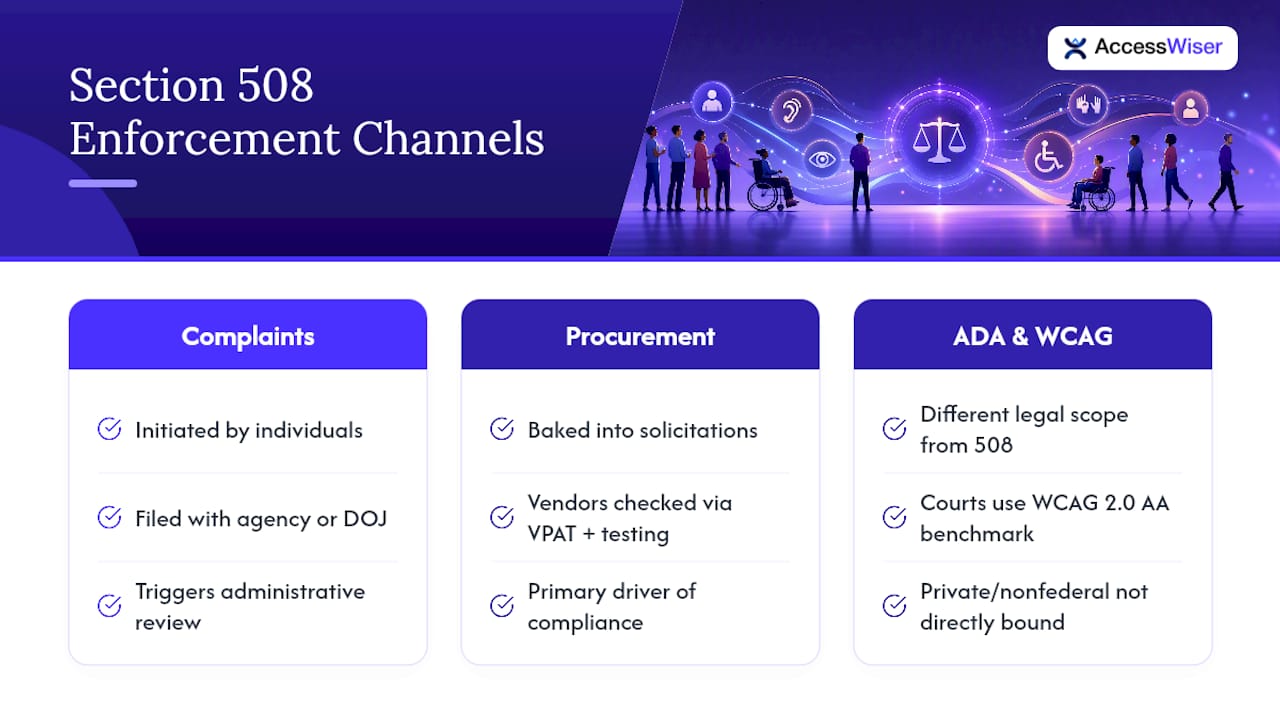
Enforcement doesn’t work like a roving inspector program. It runs primarily through two channels. The first is the administrative complaint process, where an individual who encounters an inaccessible federal website or document can file a complaint with the responsible agency or bring a lawsuit under the Rehabilitation Act. The second, and the one that actually shapes day-to-day behavior, is procurement. Federal contracting officers are expected to bake 508 requirements into solicitation language, and a vendor’s conformance documentation is part of how bids are evaluated.
That procurement mechanism is where compliance officers spend most of their real effort. Evaluating a vendor’s accessibility claims, cross-checking their VPAT against actual testing evidence, and writing contract language that holds vendors accountable post-award are the daily work of federal accessibility compliance, far more than any complaint-driven enforcement action.
Section 508 also sits in an increasingly tight relationship with the Americans with Disabilities Act. The two laws have different scopes on paper, ADA covers public accommodations broadly while 508 covers federal ICT specifically, but WCAG Level AA is the practical benchmark for both. A state or local government entity, or a private business with no federal contract, faces no direct 508 obligation. State and local governments do face the DOJ’s ADA Title II rule, which requires WCAG 2.1 AA, with compliance dates now set for April 26, 2027 for larger entities and April 26, 2028 for smaller ones. And if a private business ends up in ADA litigation over a website, WCAG 2.0 or 2.1 AA is the standard typically cited in those cases. The legal frameworks diverge; the technical expectation converges.
Mapping WCAG to Section 508: What’s Equivalent and What’s New
The relationship between the original 508 standards and the Revised 508 Standards isn’t a simple swap. According to the Access Board’s mapping guidance, of the 38 WCAG 2.0 Level A and AA success criteria, 22 are substantially equivalent to requirements that existed under the original Section 508 provisions. The remaining 16 are genuinely new obligations that many legacy federal systems were never built to satisfy.
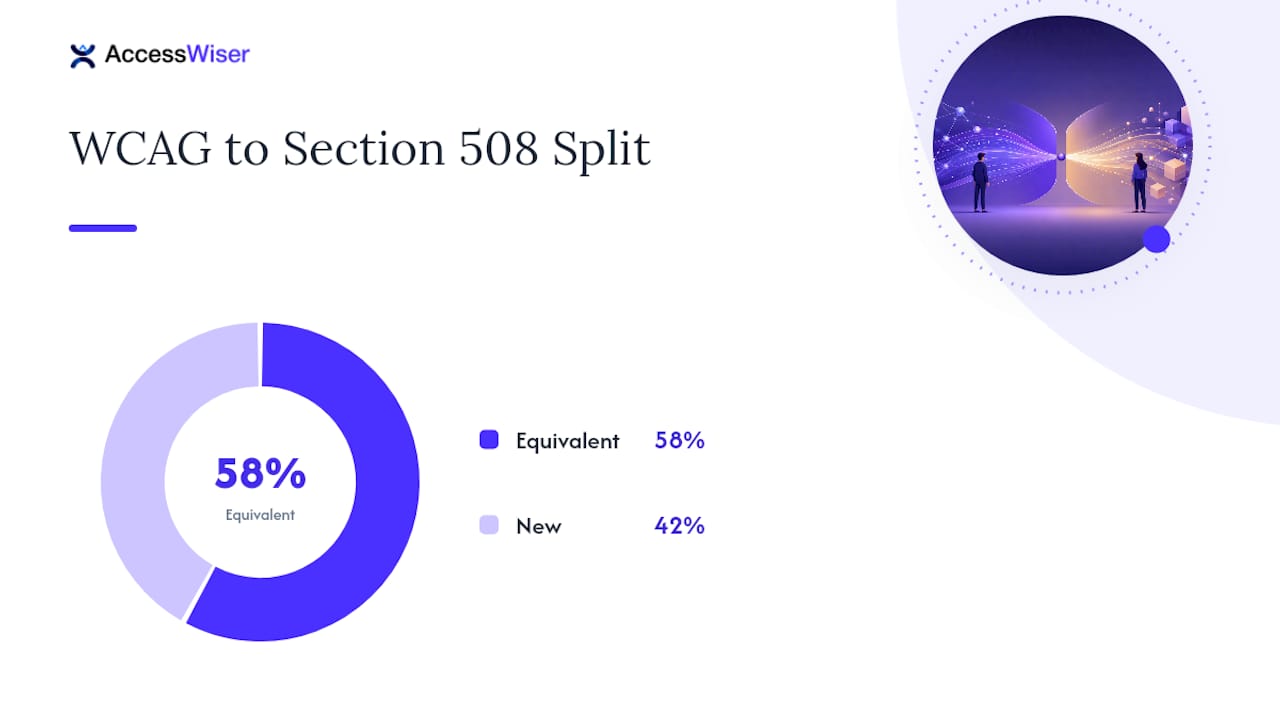
That 16 versus 22 split matters enormously for remediation planning. If your agency or client has old ICT that technically complied with the original 508 Standards published in 2000, don’t assume it still passes.
The exceptions run the other direction. Four WCAG success criteria are explicitly excepted when applying the standard to non-web documents and software, as detailed in CFR Appendix A to Part 1194:
-
2.4.1 (Bypass Blocks): not required for standalone documents or software without navigable page structures.
-
2.4.5 (Multiple Ways): excepted where a document or application doesn’t have the multi-page navigation concept it assumes.
-
3.2.3 (Consistent Navigation): excepted for the same structural reason.
-
3.2.4 (Consistent Identification): excepted where the criterion’s web-navigation assumptions don’t translate cleanly.
This is where a lot of over-remediation happens. Teams sometimes apply a blanket WCAG AA checklist to every PDF and desktop application in their inventory, burning hours fixing issues the regulation never actually required for that content type. Read the exceptions before you scope a non-web remediation project, not after.
A conforming alternate version, essentially a parallel accessible version of otherwise noncompliant content, remains acceptable under specific constraints: it must be equally up to date, reachable through a conforming mechanism, and not the default excuse for leaving the primary version broken. Regulators view it as a narrow allowance, not a workaround.
How Is Section 508 Compliance Actually Tested?
Federal testing practice runs on harmonized methods, most notably the Department of Homeland Security’s Trusted Tester program, which is built on the Section 508 ICT Testing Baseline. This gives auditors a consistent, repeatable baseline test procedure so that two different testers evaluating the same page reach the same conclusion, rather than each applying their own interpretation of “accessible enough.”
Documentation runs through the Voluntary Product Accessibility Template, or VPAT, which vendors complete to produce an Accessibility Conformance Report (ACR) stating how their product measures against each applicable success criterion. A well-built VPAT package for federal procurement should include:
-
Precise scoping language stating exactly which pages, applications, or file types were tested.
-
The specific configurations and assistive technologies used during testing (screen reader version, browser, operating system).
-
Testing dates, since stale VPATs raise red flags with contracting officers.
-
A clear statement of whether findings came from automated scanning, manual review, or user testing, and in what proportion.
That last point matters because automation has real limits. Commonly cited estimates put automated coverage at roughly 30% to 50% of accessibility barriers, depending on how issues are counted, leaving the remainder, things like logical reading order, meaningful alt text, or whether a keyboard trap actually blocks task completion, dependent on a human evaluator working through the interface directly.
Pro Tip: Never submit a VPAT built entirely from an automated scan. Reviewers who know what they’re looking at will spot the gap immediately, and it undermines trust in the rest of your documentation.
The strongest evidence packages combine dated scan results, a remediation log showing what was fixed and when, and a published accessibility statement that gives both auditors and the public a transparent view of where the organization currently stands.
A Step-by-Step Compliance Checklist for US Teams
Getting from “we know we need to comply” to “we have defensible evidence” follows a fairly consistent sequence across federal contractors and agencies alike.
-
Inventory and scope your covered assets. List every website, application, and document category that falls under federal ICT rules before you touch a single line of code.
-
Run automated scans first, then triage by impact. Automated tools surface a meaningful chunk of issues fast; sort results by how severely each one blocks a real task, not just by volume of flagged elements.
-
Perform manual, Trusted Tester–style verification. Walk through critical user flows with a keyboard only and with a screen reader, since this is where automation’s blind spots show up.
-
Document everything with dates. Build your remediation log as you go, then generate a VPAT and a public accessibility statement from that record rather than reconstructing it later.
-
Schedule recurring re-checks. Code changes reintroduce old problems constantly; a one-time audit goes stale the moment a developer ships the next release.
Pro Tip: Treat step five as non-negotiable. A common way teams fail a later audit is passing once, then letting months of unchecked code changes introduce new issues without anyone noticing.
For WCAG 2.0 AA as your legal floor, this sequence gives you a documented, repeatable process. For genuine usability gains, especially for mobile and cognitive-accessibility scenarios that 2.0 didn’t fully anticipate, layer in 2.1 and 2.2 criteria wherever your roadmap allows it.
Where AccessWiser Fits in a 508 Compliance Program
The service scans websites against WCAG 2.2 AA success criteria and maps every finding to its corresponding Section 508 requirement, helping avoid manual translation between frameworks. One detail worth knowing: WCAG 2.2 removed 4.1.1 Parsing, which Section 508 still references through WCAG 2.0, but the W3C now treats 4.1.1 as always satisfied for HTML and XML content, so a 2.2 scan doesn’t leave a gap there. Each issue traces back to the specific code element and criterion it violates, with plain-language guidance for fixing it directly in your source rather than papering over it with a runtime patch.
Dated scan records and scheduled re-checks provide compliance officers with documentation of when testing occurred, what was found, and when issues were addressed. That said, automation covers a real but partial slice of the picture. Trusted Tester–style manual verification and genuine user testing still belong in your workflow. The tool aims to reduce the manual burden, while recognizing that human judgment is still necessary.
What Compliance Checklists Miss About Real Accessibility
Meeting the legal floor and building something usable are related goals, not the same goal. A page can pass every WCAG 2.0 AA success criterion and still frustrate a screen reader user if the reading order is technically valid but logically incoherent. Measure success by whether real users complete real tasks, not by a clean checklist.
Favor fixes in your actual codebase over overlay patches that mask problems at runtime. Document every decision for the audit trail, and put re-checks on a calendar. Code changes weekly, and a passing result from last quarter says little about today’s release.
The AccessWiser Team
Get Ahead of Your Next Accessibility Audit
Manually cross-referencing WCAG 2.2 AA against Section 508 requirements for every page in your inventory eats weeks that most compliance teams don’t have. The platform scans sites against WCAG 2.2 AA criteria with Section 508 and EN 301 549 mappings, identifying the legal requirements affected and the code elements involved.
Each issue includes plain-language remediation guidance intended for permanent code fixes, rather than temporary runtime overlays. Scheduled re-checks help identify regressions before audit findings occur, and dated scan and fix records provide documentation useful for procurement officers and auditors. An optional visitor widget offers controls for contrast, text, and reading aids to support users on top of remediated code.
Start a free trial and run your first scan through AccessWiser’s accessibility solutions to see where your current site stands against WCAG 2.2 AA criteria.
Primary Sources for WCAG and Section 508 Requirements
Verify every claim in this article against the original text before you finalize any compliance decision:
-
ICT Final Rule and Revised 508 Standards, U.S. Access Board
-
Appendix A to Part 1194, Cornell Law (CFR)
-
WCAG2ICT Mapping Guidance, U.S. Access Board
Sources
-
Federal Register: ICT Final Rule and Revised 508 Standards (Access Board)
-
Appendix A to Part 1194 — Revised 508 Standards (CFR) | Cornell Law
FAQ
Does Section 508 Use WCAG?
Yes. The Revised 508 Standards incorporate WCAG 2.0 Level A and AA success criteria by reference in E205.4, making those 38 criteria the legal accessibility standard for covered federal ICT, with four specific exceptions for non-web documents and software.
Is WCAG a Legal Requirement in the US?
WCAG itself isn’t a law, but it becomes legally binding for federal agencies and contractors through Section 508, which requires conformance with WCAG 2.0 AA. State and local governments must meet WCAG 2.1 AA under the DOJ’s ADA Title II rule. For private businesses without federal contracts, WCAG 2.0 or 2.1 AA functions as the practical benchmark cited in most ADA accessibility litigation.
What Are the New WCAG Guidelines for 2026?
WCAG 2.2 remains the current published version, adding criteria such as focus not obscured, target size, consistent help, and accessible authentication beyond what WCAG 2.0 and 2.1 covered. Section 508 has not been updated to legally require 2.1 or 2.2, so 2.0 AA stays the enforceable federal baseline even as organizations increasingly adopt newer versions voluntarily.
What Are the New Laws Regarding Accessibility in the United States?
No new federal statute has replaced Section 508 or the ADA; both remain the operative legal frameworks. The biggest recent change is a regulation: the DOJ’s 2024 ADA Title II rule requires state and local governments to meet WCAG 2.1 AA, and an April 2026 interim final rule moved its compliance dates to April 26, 2027 (populations of 50,000 or more) and April 26, 2028 (smaller entities and special districts). Federal Section 508 enforcement still leans on WCAG 2.0 AA, and agencies increasingly bake accessibility requirements directly into procurement language through tools like the Accessibility Requirements Tool.
Which WCAG Success Criteria Don’t Apply to Non-Web Documents?
Four criteria are excepted for non-web documents and software under the Revised 508 Standards: 2.4.1 (Bypass Blocks), 2.4.5 (Multiple Ways), 3.2.3 (Consistent Navigation), and 3.2.4 (Consistent Identification), because these assume a multi-page web navigation structure that standalone documents and applications don’t have.
Articles on this blog are general information about web accessibility, not legal advice. Laws change and their application depends on your specific situation — for decisions with legal consequences, consult a qualified legal professional.
Articles on this blog are general information about web accessibility, not legal advice. Laws change and their application depends on your specific situation — for decisions with legal consequences, consult a qualified legal professional.